RŠ.Ninja  
  Copy this URL into an OBS "Browser Source" =>  
  You are in the director's view for room: 
You are joining room:


Add Group Video Chat to OBS


The Group Chat is EXPERIMENTAL and likely unstable.
Please report issues to steve@seguin.email


Room Name:

  • Anyone can enter a room if they know the name, so keep it unique
  • Having more than four (4) people in a room is not advisable due to performance reasons.
  • There are numerous known issues. Please report feedback.

  • With a room name entered, enter the room as a director. Links to invite guests will be provided.

    Send your camera to RTVŠ


    Select the audio/video source below and when you're ready just click START SHARING WEBCAM


    Video source:


    Audio source:

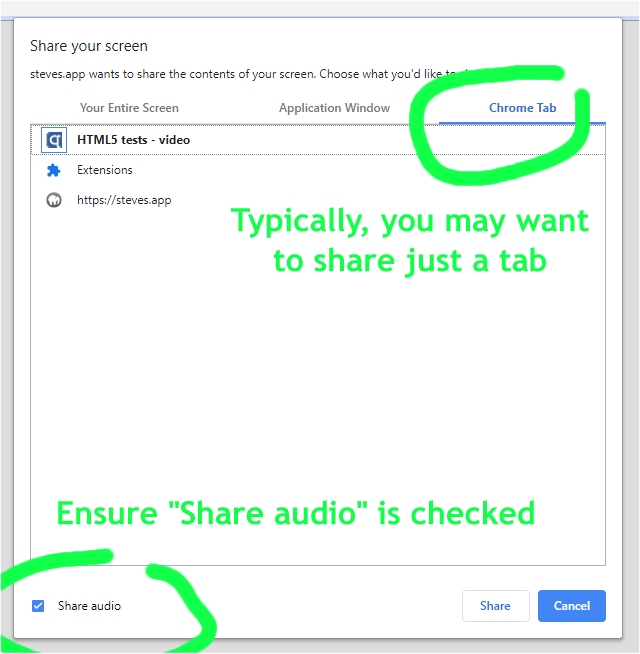
    Share your screen with RTVŠ

    note: Do not forget to click "Share audio" in Chrome.
    (Firefox does not support audio sharing.)


    Generate Invite Link


    Quick Guide


  • If your web browser asks you for permission to use webcam or microphone, select allow.
  • Select above whether you'd like to share your webcam or your screen.
  • Keep this page open as long as you wish that we receive your video.
  • If possible, don't switch to any other browser tabs during the call.
  • You can use the link you received only on one device at the same time.


  • This is OBS.Ninja, developed and provided for free as a courtesy by Steve Seguin


    Remote Control for OBS

    Volume: